
Getting started with SPARQL and tools4RDF#
This notebook demonstrates how to compose SPARQL queries programmatically, with little to no prior knowledge of SPARQL syntax.
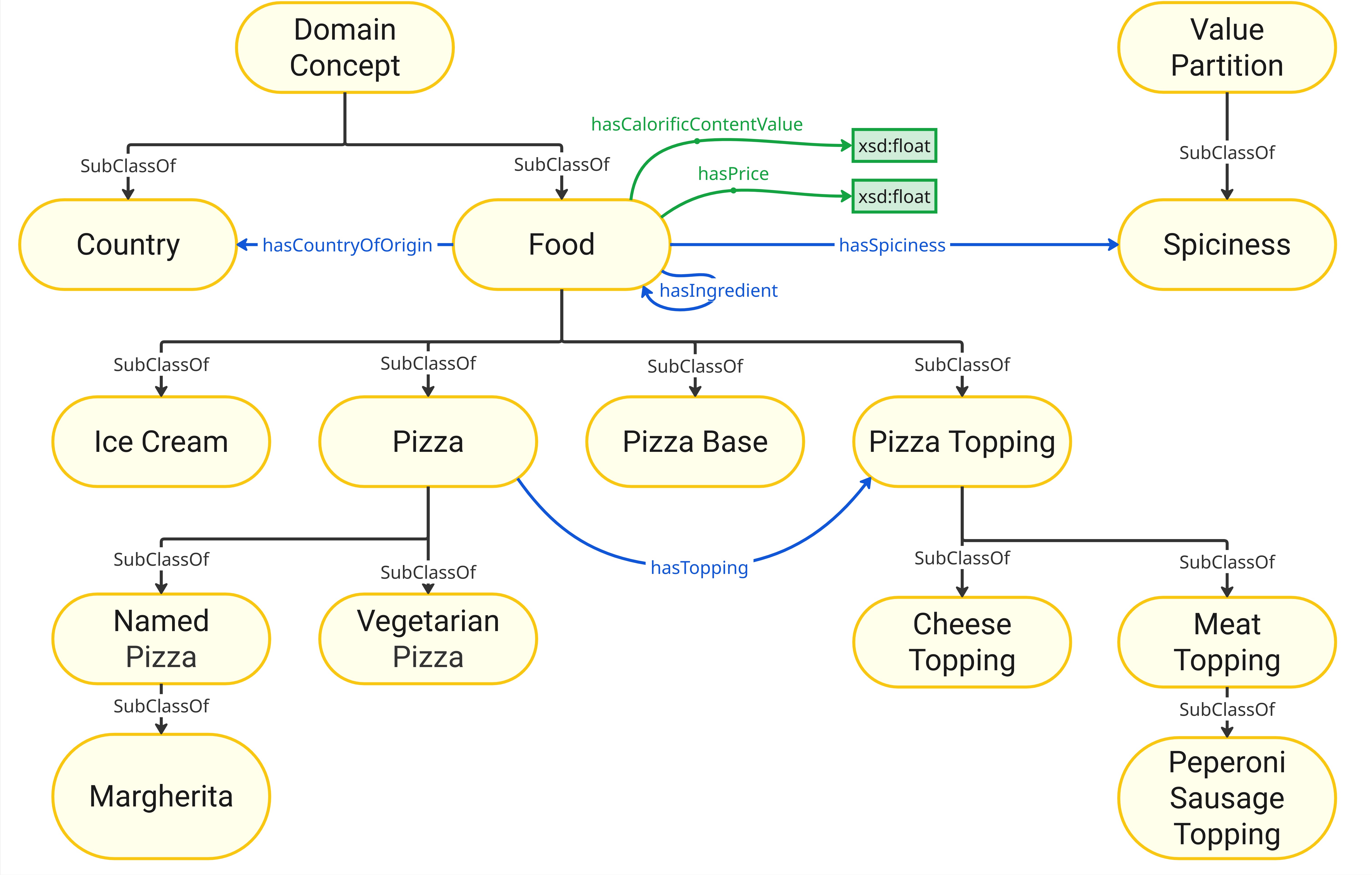
As an example, we’ll work with the well-known Pizza ontology and a set of pre-loaded RDF data.
from tools4rdf.network.network import OntologyNetwork
from rdflib import Graph
onto = OntologyNetwork("pizza.owl")
g = Graph()
g.parse("pizza_kg.ttl", format="ttl")
<Graph identifier=Nceb7f1ebdb054d74aff5e20b771efb3f (<class 'rdflib.graph.Graph'>)>
Naturally, you can write and run SPARQL queries directly. Here’s a simple example:
query = """
PREFIX pizza: <https://example.org/pizza#>
PREFIX rdf: <http://www.w3.org/1999/02/22-rdf-syntax-ns#>
SELECT DISTINCT ?Food ?hasPricevalue
WHERE {
    ?Food pizza:hasPrice ?hasPricevalue .
}"""
Running a Direct SPARQL Query Using RDFLib
results = g.query(query)
for row in results:
    print(row)
(rdflib.term.URIRef('American:245aa2f1'), rdflib.term.Literal('10.0', datatype=rdflib.term.URIRef('http://www.w3.org/2001/XMLSchema#float')))
(rdflib.term.URIRef('AmericanHot:81efd537'), rdflib.term.Literal('11.5', datatype=rdflib.term.URIRef('http://www.w3.org/2001/XMLSchema#float')))
(rdflib.term.URIRef('Pizza:bec7e5f2'), rdflib.term.Literal('11.5', datatype=rdflib.term.URIRef('http://www.w3.org/2001/XMLSchema#float')))
(rdflib.term.URIRef('IceCream:b992bbd1'), rdflib.term.Literal('7.0', datatype=rdflib.term.URIRef('http://www.w3.org/2001/XMLSchema#float')))
(rdflib.term.URIRef('Margherita:3cfeae45'), rdflib.term.Literal('8.99', datatype=rdflib.term.URIRef('http://www.w3.org/2001/XMLSchema#float')))
(rdflib.term.URIRef('Margherita:e424656a'), rdflib.term.Literal('9.5', datatype=rdflib.term.URIRef('http://www.w3.org/2001/XMLSchema#float')))
(rdflib.term.URIRef('Mushroom:b6b736c9'), rdflib.term.Literal('11.0', datatype=rdflib.term.URIRef('http://www.w3.org/2001/XMLSchema#float')))
(rdflib.term.URIRef('Pizza:71307a5a'), rdflib.term.Literal('11.0', datatype=rdflib.term.URIRef('http://www.w3.org/2001/XMLSchema#float')))
(rdflib.term.URIRef('Pizza:f9f81adc'), rdflib.term.Literal('12.99', datatype=rdflib.term.URIRef('http://www.w3.org/2001/XMLSchema#float')))
You can also construct this query programmatically. Here’s how that looks:
You can use onto.terms with tab completion to explore available ontology terms.
q = onto.query(g, onto.terms.pizza.Food.any, onto.terms.pizza.hasPrice)
q
| Food | hasPricevalue | |
|---|---|---|
| 0 | American:245aa2f1 | 10.0 |
| 1 | AmericanHot:81efd537 | 11.5 |
| 2 | Pizza:bec7e5f2 | 11.5 |
| 3 | IceCream:b992bbd1 | 7.0 |
| 4 | Margherita:3cfeae45 | 8.99 |
| 5 | Margherita:e424656a | 9.5 |
| 6 | Mushroom:b6b736c9 | 11.0 |
| 7 | Pizza:71307a5a | 11.0 |
| 8 | Pizza:f9f81adc | 12.99 |
The tools4RDF package also provides a query method that returns results as a pandas DataFrame, making further analysis easier.
Now let’s look at how to build this type of query programmatically. The function requires a source class and one or more destination classes. In this case, we want to find all pizzas that include a Peperoni Sausage Topping.
q = onto.query(g, onto.terms.pizza.Pizza, onto.terms.pizza.PeperoniSausageTopping)
q
| Pizza | PeperoniSausageTopping |
|---|
What happened here? The function tried to find the shortest path between the Pizza and PeperoniSausageTopping classes. Since both are subclasses of Food, it initially chose the hasIngredient property.
However, by increasing the num_paths parameter, we can get alternative paths. In this case, the second option uses hasTopping, which is the more appropiate query.
q = onto.query(g, onto.terms.pizza.Pizza, onto.terms.pizza.PeperoniSausageTopping, num_paths=2)
q
| Pizza | PeperoniSausageTopping | |
|---|---|---|
| 0 | American:245aa2f1 | PeperoniSausageTopping:e80908d1 |
| 1 | AmericanHot:81efd537 | PeperoniSausageTopping:e80908d1 |
Another interesting aspect here is that although we queried for Pizza, we got American and AmericanHot pizzas, which are subclasses. tools4RDF automatically picks a class and its subclasses for the query. You can change this by using Pizza.only:
q = onto.query(g, onto.terms.pizza.Pizza.only, onto.terms.pizza.PeperoniSausageTopping, num_paths=2)
q
| Pizza | PeperoniSausageTopping |
|---|
We do not get any results here, because our knowledge graph does not contain any instance of Pizza, only its subclasses.
If you know part of the path in advance, you can specify intermediate classes or properties.
For example, we can directly query for any class that has a PeperoniSausageTopping using the hasTopping object property.
q = onto.query(g, onto.terms.pizza.Pizza.any,
               [[onto.terms.pizza.hasTopping, onto.terms.pizza.PeperoniSausageTopping],])
q
| Pizza | hasTopping_PeperoniSausageTopping | |
|---|---|---|
| 0 | American:245aa2f1 | PeperoniSausageTopping:e80908d1 |
| 1 | AmericanHot:81efd537 | PeperoniSausageTopping:e80908d1 |
Alternatively, you can also start from a specific predicate and build the query outward from there.
q = onto.query(g, onto.terms.pizza.hasTopping, onto.terms.pizza.PeperoniSausageTopping)
q
| Soho | hasTopping_PeperoniSausageTopping | |
|---|---|---|
| 0 | American:245aa2f1 | PeperoniSausageTopping:e80908d1 |
| 1 | AmericanHot:81efd537 | PeperoniSausageTopping:e80908d1 |